Blog
Hovering Buttons in an NSTableView
Aug 11, 2007 — Whitney Young (Updated Feb 6, 2008)iTunes, Mail, and the Finder all have buttons that are displayed in a table view on the right hand side of the cell. When you hover over these buttons, the image used changes to indicate that it's a button. There is really no easy way to add this functionality to your own custom cell. Searching for others who tried to do the same sort of thing pulled up one thread on the coca-dev mailing list with no conclusion to the person's issue.
I just finished adding hoverable buttons to Senuti's source list, and it was very tricky. Here's what I did.
-
Created an
NSWindowsubclass for custom event dispatching -
Created an
NSTableViewsubclass for custom event dispatching -
Created a custom
NSCellto handle event notification from the table view
So the cell needs to respond to mouseMoved: events. NSButtonCell does that, you think, but NSButtonCell doesn't receive the events in an NSTableView. So that's what the NSTableView subclass is for. It handles mouse events and dispatches them to the cell. The cell isn't really part of any control, though, and is reused throughout the rows of the table. Therefore, calling the table delegate method, tableView:willDisplayCell:forTableColumn:row:, before sending messages to the cell was necessary. The cell then responds and lets the table view know whether or not it needs to redraw that cell.
And of course, you have to have the table view become the firstResponder in order to receive mouseMoved: events. If it does become the firstResponder, though, then whenever the mouse enters the table view, focus will change to that view. That's not a good thing. That's where the NSWindow subclass comes into play. Each mouseMoved: event tracked in the window is forwarded to a list of additional responders. The table view adds and removes itself from the additional responders list when the mouse enters/exits.
All that's left to do is draw the button image, and update when the mouse enters/leaves/clicks in the button area. Since this post doesn't go into much detail, the implementation of what I did is all available under the GPL. SEButtonImageTextCell, SEEventTable, and SEEventWindow.
1 Comment Tags: Apple, Cocoa, Code, GPL, Objective-C, OS X, Senuti
Apple like Microsoft?
Sep 15, 2006 — Whitney YoungiTunes 7 was released a few days ago as I'm sure many if not most Mac users are aware of. It's a pretty nice upgrade in terms of features. Nothing all that exciting, but some nice new visual sorting/searching techniques. The flip through album covers feature is cool, and iTunes finally is able to look up album artwork which is nice. I'll no longer have to look add it myself.
Ok, so what's with the title? Well I've been a Mac user for a long time. I like the consistency of the OS. Having all of my applications look and feel the same is really nice. Apple's done a great job keeping their applications about the same over the releases. Aqua started it all and then there was metal that followed and contrasts the aqua feel nicely. iTunes 6 had this new "plastic" (as some have coined it) look. It took a while to get used to, but it still bothered me a little every time I looked at it. Don't get me wrong, it looks nice, but it looks different from all of the other brushed metal apps.
Read More...4 Comments Tags: Apple, Cocoa, iTunes, Microsoft
Crash Reporter
Aug 22, 2006 — Whitney YoungI've abstracted Adium's Crash Reporter and modified it a bit. It's pretty nice.
Here's a screenshot:
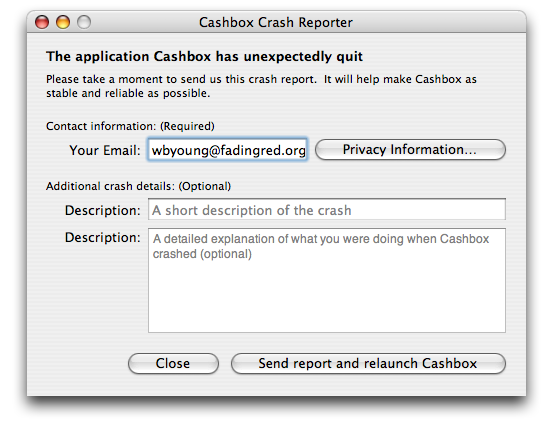
Check it out here:
svn://fadingred.org/crashreporter/trunk
No Comments Tags: Cocoa, Framework, Open Source, Software
Objective-C (Cocoa) Regex
Aug 4, 2006 — Whitney YoungIt has always bothered me that Cocoa doesn't have Regular Expressions built in. Using PCRE 6.7, I've created a small Cocoa Framework that does Regular Expressions. I know there's the AGRegex that's up on sourceforge, but I decided to take my crack at making something that might be a little different. It's not complete yet, but I figured I'd write about it since I just created a subversion repository for it.
Here are the basics:
- There's a PCRegex object
- All matching is done via calls on strings (not on the Regex object)
I chose to call methods on the strings instead of the regex objects because this is a little more like all other object oriented regular expression implementations and because I think it makes more sense that way.
Creating a regular expression is easy as:
PCRegex *regex = [PCRegex regexWithPattern:@"pattern"];
Matching regular expressions against strings is easy, too. With the previous regular expression defined:
#import <ObjCRegex/ObjCRegex.h>
...
[@"This is the string that I want to match" match:regex];
[@"This string will match because it contains the word pattern" match:regex];
With connivence methods everything is extremely simple:
#import <ObjCRegex/ObjCRegex.h>
...
[@"This is the string that I want to match" matchPattern:@"pattern"];
[@"This is the string that I want to match" matchPattern:@"str.*"];
Of course if you want something more powerful, you're wondering what I did to deal with backreferences. Again, it's pretty simple. Here's an example:
#import <ObjCRegex/ObjCRegex.h>
...
NSArray *backrefArray;
PCRegex *regex = [PCRegex regexWithPattern:@"([^ ]*) ([^ ]*)"];
[@"first second third" match:regex backreferences:backrefArray];
NSString *first_match = [[backrefArray objectAtIndex:1] string];
NSString *second_match = [[backrefArray objectAtIndex:2] string];
Like many other implementations, the 0th item in the backreference array is the fully matched string, so in the previous example it would be @"first second".
There are some things that are incomplete and/or you should know before you get excited about using it:
- There's no support for named backreference (yet)
- UTF-8 isn't supported (thought PCRE dose support it, so if someone wants to add support, that'd be great)
- I've done little testing with it, though it seems to work just fine
- GPL license as always
So if you're still reading, you may be interested in checking out the code which can be done via:
svn co svn://fadingred.org/objcregex/trunk objcregex
Enjoy!
2 Comments Tags: Cocoa, Code, Objective-C, Regex